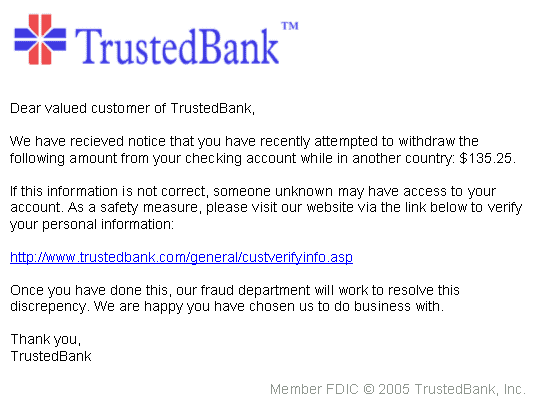
How Phishing Works
Phishing attacks exploit human psychology, often relying on fear, urgency, or curiosity. Here’s how they commonly unfold:
- Creating Urgency: Many phishing emails create a sense of urgency, requiring immediate action—like threatening account suspensions or unauthorized transactions. This tactic is meant to trigger a quick, emotional response, minimizing rational thinking.
- Luring Victims: By imitating reputable brands or services, attackers make their requests seem legitimate. Trusted companies often have recognizable logos and language that cybercriminals mimic. This familiarity can lead victims to drop their guard.
- Insidious Links: Victims are often directed to websites that closely resemble trusted sites, making them more likely to enter sensitive information. For instance, a phishing site may use a URL that looks nearly identical to the real site but contains subtle differences, like a missing letter or an extra character. Many people might not notice these small changes.
Recognizing these tactics can significantly reduce the chances of falling victim to a phishing attack. Armed with this knowledge, individuals can better safeguard their data.
Warning Signs of Phishing Attempts
Identifying potential phishing attempts can be challenging, but there are several warning signs to watch out for:
- Unusual Sender Email: Always check the sender’s email address for spelling errors or variations that mimic legitimate domains. A slight alteration can indicate a fraudulent source.
- Generic Greetings: Phishing emails tend to use generic greetings like “Dear Customer” instead of personalized salutations. This is a common indicator of mass distribution phishing attempts.
- Spelling and Grammar Errors: Many phishing attempts originate from non-native English speakers, leading to awkward phrasing and typos.
- Unexpected Attachments: Be wary of emails that come with attachments you weren’t expecting. These attachments can be malicious.
- Mismatched URLs: Hover over links to see the actual URL. If it looks odd or doesn’t match the context of the email, avoid clicking.